If you're after a quick little rigidbody sim, I'd suggest giving this a try. Simple, quick, fairly consistent and reliable (so far!).
Just make sure you keep organised and clean the scene up straight after baking, crashes do happen...
Details:
http://bulletphysics.org/mediawiki-1.5.8/index.php/Maya_Dynamica_Plugin
Downloads:
https://code.google.com/p/dynamica/downloads/list
Siggraph 2011 vid:
http://mbakr.squarespace.com/blog/siggraph-2011-destruction-dynamics-for-film-and-game-product.html
Showing posts with label downloads. Show all posts
Showing posts with label downloads. Show all posts
Thursday, 18 April 2013


Sunday, 26 August 2012
[Maya][Python] Querying soft selection
Handy little script modified from here to query and select the soft selection influenced components.
This one instead returns the influenced objects. Great for quickly querying the objects within a specific distance of another object.
This one instead returns the influenced objects. Great for quickly querying the objects within a specific distance of another object.
Friday, 13 April 2012
Script: ld_selectMe (v2)
Re-wrote my free selection-set creation script, 'ld_selectMe' in python.
Updates include a more dynamic UI, faster set creation and overall, a much better write of the actual selection script, allowing the same functionality but only much, much faster than its mel counterpart.
You can download the re-write for free here (mediafire.com)
or creativecrash here.
Any comments/suggestions welcome.
Updates include a more dynamic UI, faster set creation and overall, a much better write of the actual selection script, allowing the same functionality but only much, much faster than its mel counterpart.
You can download the re-write for free here (mediafire.com)
or creativecrash here.
Any comments/suggestions welcome.
Wednesday, 14 March 2012
ld_mirrorMe v1.5.0
Edit: Source is now available on GitHub.
Alongside my softCluster script, you'll definitely notice a speed increase in your workflow.
Download it here (mediafire link).
Download, extract and place script in maya's script directory and use
import ld_mirrorMe
ld_mirrorMe.GUI()
It's features are shown on this much quicker demo (v1.0.0), supporting multi-mirroring for all modes.
Full details:
- 3 modes:
1. Curve - mirrors nurbs curves, ideal for mirroring rig controls,
2. Mesh - mirrors geo, ideal for mirroring blendshape targets,
3. Deformer - mirrors only clusters (at present), uses object's pivot for mirroring.
- multi-mirroring on all 3 modes,
- choose mirror axis,
- search and replace,
- alter new objects position (currently either world 0, target, mirror or original - depending on mode),
- world position/rotation based, will work wherever or whatever the targets connected to,
- entry objects names retained, if multiple copies needed (ideal for multi-clustering),
- colourize option for Curves, if given curve is coloured (transform or shape), its mirror can be assigned a different colour,
- quick and simple to use.
Updates:
09/03/12 - 0.5.0
Initial working version.
10/03/12 - 0.9.5
Tidied UI and reduced/cleaned code.
13/03/12 - 1.0.0
Added colour option for curves.
Removed all pymel (speed issues).
Allowed multi-mirroring.
14/03/12 - 1.5.0
Thanks to Matt Murray for feedback for further improvements.
Added option to mirror world position of mirrored curve.
Added further error-checking for all modes.
Fixed bug causing unwanted locking of attributes.
Added option to disable colouring of mirrored curve.
Again, any feedback, problems/bugs or ideas lemmie know and I'll do what I can.
Wednesday, 7 March 2012
Python: Create Cluster from soft selection
Edit: Source now available on GitHub.
or from creativecrash here.
All thanks to Brian Escribano for his softSelection() code that gathers the id and weights of the current soft selection (basically, all the hard work).
It was simple enough to apply that information to a new cluster.
Usage:
Extract and place script file into a maya script directory (or python path directory) and run with this
import ld_createSoftCluster as sc
sc.ld_createSoftCluster()
and thanks to Valen Wagner for the icon.
Update:
07/03/12 - 0.4.0
Alters cluster position to match selection rather than influenced average.
Thursday, 23 February 2012
Mel: ld_animToCurve - create nurbs curve from moving objects or verts
Download the script directly, here (follow link and place it in maya's script directory)
or from creativecrash here.
Creates a nurbs curve for each selected object and/or vert over a series of frames (like a motionTrail, but without the motionTrail bit).
Works using xforms - so object could be skinned, constrained, driven by expressions etc,
Simple to cleanup - just rebuild the curve,
Simple to use - select the objects and/or verts you want and execute using ld_animToCurve ;
Useful for quickly putting together complex shapes or tracking a vert's/object's position.
Updates:
07/03/12: 0.6.0
Fixed issue selecting some verts.
0.7.0
Added poly faces - now requires modified version of owen burgess' 2009 script "getfacecenters.py" (included).
or from creativecrash here.
Creates a nurbs curve for each selected object and/or vert over a series of frames (like a motionTrail, but without the motionTrail bit).
Works using xforms - so object could be skinned, constrained, driven by expressions etc,
Simple to cleanup - just rebuild the curve,
Simple to use - select the objects and/or verts you want and execute using ld_animToCurve ;
Useful for quickly putting together complex shapes or tracking a vert's/object's position.
Updates:
07/03/12: 0.6.0
Fixed issue selecting some verts.
0.7.0
Added poly faces - now requires modified version of owen burgess' 2009 script "getfacecenters.py" (included).
Wednesday, 18 January 2012
ld_animateMe v1.0.0
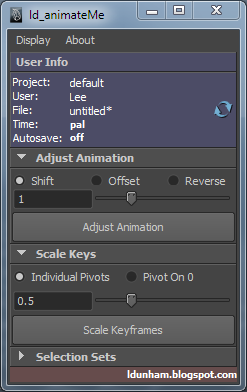
Re-arrange, offset and reverse keyframes, plus other useful tools.
To Install:
Place the downloaded "ld_animateMe.mel" file into one of your Maya scripts directories, restart Maya and use the following code to load the UI.
ld_animateMe;
To Use:
animateMe is designed to be compact and clutter free, giving you the valuable screen space you need.
Besides minimizing the frames for each section, you can remove it from the tool under the "Display" menu by unchecking the related box. If you cant it back, simply re-check the box.
As well as clicking the relevant buttons, you can use the sliders to adjust the value you want and once released, it will run that tool, making it as quick as possible to use.
- User Info:
The user info is designed to quickly let you know some useful information regarding your scene that could potentially save hassle later, such as; Forgetting to turn auto-save on, or whether your animating to 24fps or 25. The information is reloaded on creation of the UI, or by clicking the refresh icon to the right.
- Adjust Animation - Shift mode:
To adjust animation, you must select keyframes from either the timeline, or the curve editor.
Entering a number will shift the selected keys by that value, whether positive (ie "2" = shift selected keys 2 frames later, or "-2" = shift selected keys 2 frames earlier.)
EDIT: 19/01/2012 - v 1.2.0
- If no range in timeline or keys selected in curve editor, animtaion will be adjusted from current point onwards.
- Adjust Animation - Offset mode:
To adjust animation, you must select keyframes from either the timeline, or the curve editor.
Offset animation works with your selection order. It will offset every selected object's selected keyframes by X amount of frames relative to the object selected before it.
1. object1, 2 and 3 each has a key on frame 1.
2. You select them in numerical order (object1 first and object3 last).
3. You use Offset mode with value of 2.
4. object2's key will now be at frame 3 and object3's key will now be at frame 5.

- Adjust Animation - Reverse mode:
You can reverse your animation by selecting the keys from either the timeline, or the curve editor.
- Scale Keys - Individual Pivots:
To use scale keys, you must have keys or curves selected in the curve editor.
For every key selected, it will scale it at the point between its previous and next value, as if it was blending the key between the keys either side. It works great for toning up or down, facial expressions, poses etc or even adding overshoot.
- Scale Keys - Pivot on 0:
To use scale keys, you must have keys or curves selected in the curve editor.
This mode will scale all the selected keys the same pivot of 0.
- Selection Sets:
Compact version of ld_selectMe (Link).
Maya's own selection sets are node based, meaning that creating a selection set for a character will only work in that file, which is and very limiting. This tool, instead, compiles a selection script and saves it to shelf to be used in any file, along with a toggle selection function by ctrl+clicking the shelf button.
"Name" is to enter the name of the button as it will appear on the shelf.
"clear" clears the list and name field.
"+" adds selected objects to list.
"-" removes selected list items from list (can also press "delete" key).
EDIT: 19/01/2012 - v 1.2.0
- Now creates selection shelf button that will attempt to use namespace of the FIRST currently selected object, if no objects currently select, default one is used.
News/Updates:
Version 1.5.0 is underway, automating the user info with extra information displayed, such as the last saved time for the current file, snapping tools (including component snapping), and a new Scale Keys mode, called "Falloff".
Thanks to quick feedback, I've been able to make some adjustments to the functionality of the tool.
Version 1.2.0:
19/01/2012 -
Edited functionality of Adjust Animation.
- If no range in timeline or keys selected in curve editor, animtaion will be adjusted from current point onwards.
Edited functionality of Selection Sets.
- Now creates selection shelf button that will attempt to use namespace of the FIRST currently selected object, if no objects currently select, default one is used.
Version 1.2.1:
19/01/2012 -
Fixed issue with Selection Sets update.
- If current selection's namespace didnt't contain an item in selection list, it would error, it will now instead just use default namespace.
Any suggestions, please let me know.
Tuesday, 22 November 2011
ld_selectMe
a useful tool for building script based selection sets (mayas own are node based, so will only work in the scene you build them in). Selection Sets build with this also allows toggling of selection with ctrl+LMB.
Download it here free:
http://www.creativecrash.com/maya/downloads/scripts-plugins/c/ld_selectme-selection-sets
Currently building a customisable animation toolset (ld_animateMe) which will have a range of useful tools that'll save people time (possibly include links to external tools and ablity to add your own).
Its gotta be simple, quick, customisable and FREE!
Download it here free:
http://www.creativecrash.com/maya/downloads/scripts-plugins/c/ld_selectme-selection-sets
Currently building a customisable animation toolset (ld_animateMe) which will have a range of useful tools that'll save people time (possibly include links to external tools and ablity to add your own).
Its gotta be simple, quick, customisable and FREE!
Subscribe to:
Posts (Atom)