I've posted the sources for some of my older tools on GitHub.
Tuesday, 29 September 2020


Sunday, 12 June 2016
Scott Eaton: Portraiture and Facial Anatomy for Artists
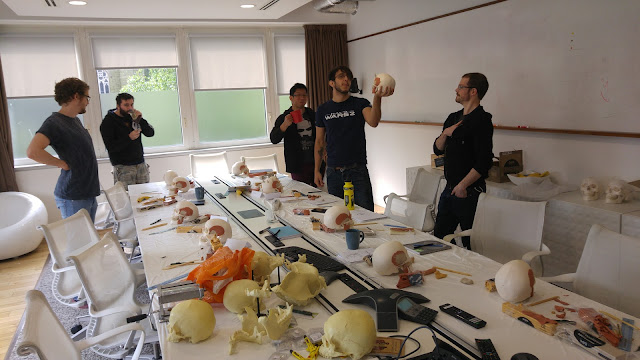
I recently had the pleasure of completing the 3 day Portraiture and Facial Anatomy course with Scott Eaton, and I cannot recommend it highly enough.


Adding the Frontalis, Procerus, Corrugator supercilii (should have been under the frontalis), Orbicularis oris, Buccinator and Buccal fat (far too much!).


Adding Zygomaticus major and minor, Depressor labii inferioris, Depressor anguli oris, Mentalis, Levator labii superioris and chin fat (for the mentalis).


Scott shared a wealth of knowledge on facial anatomy - how to recognise and understand various landmarks on the face for construction and deformation, variations on the bell curve, the differences between gender, race and species, as well as FACS breakdowns and so much more.
Here's an overview of the construction task over the three days.


Adding the eyeballs, orbital fat, superior and inferior Tarsus, Levator tendon, Canthus and Orbicularis oculi. Also, cleaning up where the Masseter joins the Zygomatic bone.


Adding the Frontalis, Procerus, Corrugator supercilii (should have been under the frontalis), Orbicularis oris, Buccinator and Buccal fat (far too much!).


Adding Zygomaticus major and minor, Depressor labii inferioris, Depressor anguli oris, Mentalis, Levator labii superioris and chin fat (for the mentalis).


I need to practice noses!

Here are a few links you may want to bookmark;
Sunday, 5 June 2016
Python in Maya: Simple node sorting
When applying a worldspace or relative transform to nodes in Maya, you'll often have to account for;
- Control behaviour type (IK, Pole Vectors etc)
- Control hierarchy
This is where you will probably need to look at sorting your list of nodes prior to applying the data.
Also, space-switch sorting will want to be run as an additional pass over control type and hierarchy. This dependency check will vary based on the type of space-switch setup the rigs are using.
Also, space-switch sorting will want to be run as an additional pass over control type and hierarchy. This dependency check will vary based on the type of space-switch setup the rigs are using.
I've added a simple sort setup with individual and combined priorities.
Edit: Enable web view if browsing on mobile.
Edit: Enable web view if browsing on mobile.
I'd love to hear your thoughts and how you approach this task.
Thursday, 26 May 2016
Huh... I forgot this thing still existed.
So, we've finally released Total War: Warhammer.
What a project! Huge amount of work and fun!
Very proud to have worked on this game, and to work with so many talented developers.
Perhaps I'll give this blog another go.
Thursday, 18 April 2013
a nice alternative to a quick Rigid Bodies sim: Dynamica Plugin
If you're after a quick little rigidbody sim, I'd suggest giving this a try. Simple, quick, fairly consistent and reliable (so far!).
Just make sure you keep organised and clean the scene up straight after baking, crashes do happen...
Details:
http://bulletphysics.org/mediawiki-1.5.8/index.php/Maya_Dynamica_Plugin
Downloads:
https://code.google.com/p/dynamica/downloads/list
Siggraph 2011 vid:
http://mbakr.squarespace.com/blog/siggraph-2011-destruction-dynamics-for-film-and-game-product.html
Just make sure you keep organised and clean the scene up straight after baking, crashes do happen...
Details:
http://bulletphysics.org/mediawiki-1.5.8/index.php/Maya_Dynamica_Plugin
Downloads:
https://code.google.com/p/dynamica/downloads/list
Siggraph 2011 vid:
http://mbakr.squarespace.com/blog/siggraph-2011-destruction-dynamics-for-film-and-game-product.html
Thursday, 28 February 2013
quick update
Been mega busy last 6 months, alot of changes, not much time to work on personal stuff, but had a great learning curve so plenty to look into once things slow down.
Sunday, 26 August 2012
[Maya][Python] Querying soft selection
Handy little script modified from here to query and select the soft selection influenced components.
This one instead returns the influenced objects. Great for quickly querying the objects within a specific distance of another object.
This one instead returns the influenced objects. Great for quickly querying the objects within a specific distance of another object.
Monday, 2 July 2012

Thursday, 31 May 2012
Update

Thought i'd update, considering it has been a month or two.
Been pretty busy lately with the moving, new job and 5-hour commute (temporary), so I haven't had much time to work on any of my own stuff, or do... well... anything.
Once settled i'll probably get back on it.
Friday, 13 April 2012
Script: ld_selectMe (v2)
Re-wrote my free selection-set creation script, 'ld_selectMe' in python.
Updates include a more dynamic UI, faster set creation and overall, a much better write of the actual selection script, allowing the same functionality but only much, much faster than its mel counterpart.
You can download the re-write for free here (mediafire.com)
or creativecrash here.
Any comments/suggestions welcome.
Updates include a more dynamic UI, faster set creation and overall, a much better write of the actual selection script, allowing the same functionality but only much, much faster than its mel counterpart.
You can download the re-write for free here (mediafire.com)
or creativecrash here.
Any comments/suggestions welcome.
Tuesday, 3 April 2012
Friday, 30 March 2012
Python: Writing nested dictionaries to file
Best suggestion I could think of was using cPickle (if available).
However im all for cPickle.
try:
    import cPickle as pickle
except:
    import pickle

# nested DICTIONARY
data = { 'one': {'label': 'This is shot 001', 'start': 1, 'end': 10},
         'two': {'label': 'This is shot 002', 'start': 11, 'end': 25},
         'three': {'label': 'This is shot 003 - Needs Editing', 'start': 26, 'end': 50} }

# write to file with cPickle/pickle (as binary)
def ld_writeDicts(filePath,dict):
    f=open(filePath,'w')
    newData = pickle.dumps(dict, 1)
    f.write(newData)
    f.close()

ld_writeDicts('C:/Users/Lee/Desktop/test2.dta',data)

#############

# read file decoding with cPickle/pickle (as binary)
def ld_readDicts(filePath):
    f=open(filePath,'r')
    data = pickle.load(f)
    f.close()
    return data

# return dict data to new dict
newDataDict = ld_readDicts('C:/Users/Lee/Desktop/test2.dta')
# test nesting
print newDataDict['one']['label']
As you can see its very simple to use and very quick. There are loads of alternatives if you wanted a nicely arranged, readable file, including json:
import json

# nested DICTIONARY
data = { 'one': {'label': 'This is shot 001', 'start': 1, 'end': 10},
         'two': {'label': 'This is shot 002', 'start': 11, 'end': 25},
         'three': {'label': 'This is shot 003 - Needs Editing', 'start': 26, 'end': 50} }

# write to file with json encoding
def ld_writeDicts(filePath,dict):
    f=open(filePath,'w')
    newData = json.dumps(dict, sort_keys=True, indent=4)
    f.write(newData)
    f.close()

ld_writeDicts('C:/Users/Lee/Desktop/test',data)


# read file decoding with json
def ld_readDicts(filePath):
    f=open(filePath,'r')
    data = json.loads(f.read())
    f.close()
    return data

# return dict data to new dict
newDataDict = ld_readDicts('C:/Users/Lee/Desktop/test.dta')
# test nesting
print newDataDict['one']['label']
However im all for cPickle.
Thursday, 15 March 2012
Mel: Invert Selection from a render layer
Thought I might post up this useful code someone asked for...
It'll invert the selection for whatever visible transform objects are in the current render layer. Its not fantastic but it was a 5-minute job.
//  ld_invertSel_rlyr.mel  0.2
//
//  Authors:     Lee Dunham
//  Licence:     Creative Commons, Attribution, Share Alike
//  About:       Inverts selection for visible objects in current render layer.
//  Usage:
//      ld_invertSel_rlyr ;
global proc ld_invertSel_rlyr(){
string $currentRenderLayer=`editRenderLayerGlobals -q -currentRenderLayer` ;
string $objsRenLayer[]=stringArrayRemoveDuplicates(`editRenderLayerMembers -q $currentRenderLayer`) ;
for($obj in $objsRenLayer)
    if(`getAttr ($obj+".v")`==1 && `objectType -isType "transform" $obj`)
        select -tgl $obj ;
    else
        select -d $obj ;
}
It'll invert the selection for whatever visible transform objects are in the current render layer. Its not fantastic but it was a 5-minute job.
Wednesday, 14 March 2012
ld_mirrorMe v1.5.0
Edit: Source is now available on GitHub.
Alongside my softCluster script, you'll definitely notice a speed increase in your workflow.
Download it here (mediafire link).
Download, extract and place script in maya's script directory and use
import ld_mirrorMe
ld_mirrorMe.GUI()
It's features are shown on this much quicker demo (v1.0.0), supporting multi-mirroring for all modes.
Full details:
- 3 modes:
1. Curve - mirrors nurbs curves, ideal for mirroring rig controls,
2. Mesh - mirrors geo, ideal for mirroring blendshape targets,
3. Deformer - mirrors only clusters (at present), uses object's pivot for mirroring.
- multi-mirroring on all 3 modes,
- choose mirror axis,
- search and replace,
- alter new objects position (currently either world 0, target, mirror or original - depending on mode),
- world position/rotation based, will work wherever or whatever the targets connected to,
- entry objects names retained, if multiple copies needed (ideal for multi-clustering),
- colourize option for Curves, if given curve is coloured (transform or shape), its mirror can be assigned a different colour,
- quick and simple to use.
Updates:
09/03/12 - 0.5.0
Initial working version.
10/03/12 - 0.9.5
Tidied UI and reduced/cleaned code.
13/03/12 - 1.0.0
Added colour option for curves.
Removed all pymel (speed issues).
Allowed multi-mirroring.
14/03/12 - 1.5.0
Thanks to Matt Murray for feedback for further improvements.
Added option to mirror world position of mirrored curve.
Added further error-checking for all modes.
Fixed bug causing unwanted locking of attributes.
Added option to disable colouring of mirrored curve.
Again, any feedback, problems/bugs or ideas lemmie know and I'll do what I can.
Saturday, 10 March 2012
ld_mirrorMe tool demo
Just made a quick demo for one of my 3 main toolsets, (ld_animateMe v2, ld_rigMe v1 and ld_mirrorMe v.9.5) the ld_mirrorMe tool, something I started a while ago but put off.
This demo primarily shows mirroring on objects from world 0, but everything is calculated from worldspace and works accordingly, it doesn't matter where it is or what its connected/parented to, the mirror will work as expected.
Details:
3 modes - Curve, Mesh and Cluster (at present),
- Curve - Primarily for mirroring nurbs curves for controllers, Mesh - Primarily for mirroring blendshapes (can mirror multiple targets at the same time), and Cluster - (developing for other deformers), given a deformer and its mesh will mirror the deformer over giving a correctly mirrored pivot and origin based on the objects pivot.
Search and replace feature,
Choose mirror axis,
Choose new objects position,
World based - will work wherever or whatever the targets connected to,
Entries retained, no need to keep adding same object of multiple copies needed,
Simple to use.
This was initially going to just be a tool for my rigging UI (ld_rigMe), but I prefer having it separate.
Any ideas/comments welcome.
This demo primarily shows mirroring on objects from world 0, but everything is calculated from worldspace and works accordingly, it doesn't matter where it is or what its connected/parented to, the mirror will work as expected.
Details:
3 modes - Curve, Mesh and Cluster (at present),
- Curve - Primarily for mirroring nurbs curves for controllers, Mesh - Primarily for mirroring blendshapes (can mirror multiple targets at the same time), and Cluster - (developing for other deformers), given a deformer and its mesh will mirror the deformer over giving a correctly mirrored pivot and origin based on the objects pivot.
Search and replace feature,
Choose mirror axis,
Choose new objects position,
World based - will work wherever or whatever the targets connected to,
Entries retained, no need to keep adding same object of multiple copies needed,
Simple to use.
This was initially going to just be a tool for my rigging UI (ld_rigMe), but I prefer having it separate.
Any ideas/comments welcome.
Wednesday, 7 March 2012
Python: Create Cluster from soft selection
Edit: Source now available on GitHub.
or from creativecrash here.
All thanks to Brian Escribano for his softSelection() code that gathers the id and weights of the current soft selection (basically, all the hard work).
It was simple enough to apply that information to a new cluster.
Usage:
Extract and place script file into a maya script directory (or python path directory) and run with this
import ld_createSoftCluster as sc
sc.ld_createSoftCluster()
and thanks to Valen Wagner for the icon.
Update:
07/03/12 - 0.4.0
Alters cluster position to match selection rather than influenced average.
Sunday, 4 March 2012
Showreel 2011-12
Latest work from previous project, Ha Ha Hairies, where I worked for Red Wire Media as the Character TD/Animator.
Reel Breakdown:
Overview:
Rigged all shown characters, scripts and GUI's.
Sequence 1 (00:00:10):
Rigged main character 'Kwiff';
- Rig fully scalable and modularly built to provide easy updating of rig if needed.
- Simple Nurbs-based selection GUI for easy interaction.
Sequence 2 (00:00:31):
Hybrid IK/FK spine for extreme posing and toony nature of show;
- Broken hierarchies to separate upper and lower posing and flexibility.
- Traditional FK control during rotation, controllable volume preservation during translation.
- Position and orient switching for full IK control.
Sequence 3 (00:00:39):
Stretchy, bendy, volume-preserving limbs;
- With custom foot-roll, banking and various pivoting attributes.
Sequence 4 (00:01:18):
Various scripts to assist posing and animation;
- Ik/Fk blending, with snapping between the two over a single frame or a range of frames.
- Fk setup to mirror live rotation.
- Script to mirror or flip any part of the rig, including entire poses.
Sequence 5 (00:01:31):
Animator-friendly finger controls;
- Setup to allow quick posing of fingers with 2 attributes, as well as individual control over each finger via attributes and individual controllers.
Sequence 6 (00:01:36):
Insert-blink script;
- Based on animator designs, for a time-saving script.
Sequence 7 (00:01:41):
Selection GUI;
- Interchangeable between full rig and facial controls.
- Varying levels of detail.
Sequence 8 (00:02:19):
Animator friendly facial rig;
- Minimal, joystick inspired controls with multiple functions to provide alot of interactivity with minimal effort.
- Joint and blendshape based, with interactivity between the controls for quicker, stronger posing.
- Tweaking controls for more specific expressions and fine-tuning.
Sequence 9 (00:02:44):
Test facial rig;
- Use of multiple, individually controllable deformers, built into the rig.
- FK beak with tweaking lip controls.
- Various deformers on expressive areas of the face.
- Re-postionable eye sockets.
- Detachable upper/lower head for extreme posing.
Sequence 10 (00:03:12):
Test facial rig - Deform test;
- All deformers work together, rather than prioritising over each other.
- Complete squash, stretching and deformation over the head rig whilst maintaining any pose, blendshape or joint-based.
- Whilst maintaining that important ability to scale.
Reel Breakdown:
Overview:
Rigged all shown characters, scripts and GUI's.
Sequence 1 (00:00:10):
Rigged main character 'Kwiff';
- Rig fully scalable and modularly built to provide easy updating of rig if needed.
- Simple Nurbs-based selection GUI for easy interaction.
Sequence 2 (00:00:31):
Hybrid IK/FK spine for extreme posing and toony nature of show;
- Broken hierarchies to separate upper and lower posing and flexibility.
- Traditional FK control during rotation, controllable volume preservation during translation.
- Position and orient switching for full IK control.
Sequence 3 (00:00:39):
Stretchy, bendy, volume-preserving limbs;
- With custom foot-roll, banking and various pivoting attributes.
Sequence 4 (00:01:18):
Various scripts to assist posing and animation;
- Ik/Fk blending, with snapping between the two over a single frame or a range of frames.
- Fk setup to mirror live rotation.
- Script to mirror or flip any part of the rig, including entire poses.
Sequence 5 (00:01:31):
Animator-friendly finger controls;
- Setup to allow quick posing of fingers with 2 attributes, as well as individual control over each finger via attributes and individual controllers.
Sequence 6 (00:01:36):
Insert-blink script;
- Based on animator designs, for a time-saving script.
Sequence 7 (00:01:41):
Selection GUI;
- Interchangeable between full rig and facial controls.
- Varying levels of detail.
Sequence 8 (00:02:19):
Animator friendly facial rig;
- Minimal, joystick inspired controls with multiple functions to provide alot of interactivity with minimal effort.
- Joint and blendshape based, with interactivity between the controls for quicker, stronger posing.
- Tweaking controls for more specific expressions and fine-tuning.
Sequence 9 (00:02:44):
Test facial rig;
- Use of multiple, individually controllable deformers, built into the rig.
- FK beak with tweaking lip controls.
- Various deformers on expressive areas of the face.
- Re-postionable eye sockets.
- Detachable upper/lower head for extreme posing.
Sequence 10 (00:03:12):
Test facial rig - Deform test;
- All deformers work together, rather than prioritising over each other.
- Complete squash, stretching and deformation over the head rig whilst maintaining any pose, blendshape or joint-based.
- Whilst maintaining that important ability to scale.
Thursday, 23 February 2012
Mel: ld_animToCurve - create nurbs curve from moving objects or verts
Download the script directly, here (follow link and place it in maya's script directory)
or from creativecrash here.
Creates a nurbs curve for each selected object and/or vert over a series of frames (like a motionTrail, but without the motionTrail bit).
Works using xforms - so object could be skinned, constrained, driven by expressions etc,
Simple to cleanup - just rebuild the curve,
Simple to use - select the objects and/or verts you want and execute using ld_animToCurve ;
Useful for quickly putting together complex shapes or tracking a vert's/object's position.
Updates:
07/03/12: 0.6.0
Fixed issue selecting some verts.
0.7.0
Added poly faces - now requires modified version of owen burgess' 2009 script "getfacecenters.py" (included).
or from creativecrash here.
Creates a nurbs curve for each selected object and/or vert over a series of frames (like a motionTrail, but without the motionTrail bit).
Works using xforms - so object could be skinned, constrained, driven by expressions etc,
Simple to cleanup - just rebuild the curve,
Simple to use - select the objects and/or verts you want and execute using ld_animToCurve ;
Useful for quickly putting together complex shapes or tracking a vert's/object's position.
Updates:
07/03/12: 0.6.0
Fixed issue selecting some verts.
0.7.0
Added poly faces - now requires modified version of owen burgess' 2009 script "getfacecenters.py" (included).
Tuesday, 21 February 2012
Mel: Query part of a string, given its index and separator: PART 3
Update from PART 2.
Thanks to Viktoras Makauskas for the suggestions and link.
Changes include:
1. Separating the indexing to individual ints instead of a string that needs to get split.
2. Using the indexes to specify the token, not the separator.
3. More error checking.
Main difference is 0 -1 will now return the entire string rather than all but the last token (as it does in Python), mainly for functionality due to the removal of the colon. Can still return one item using the same int (ie the last token would be -1 -1).
Thanks to Viktoras Makauskas for the suggestions and link.
// get an item from a string given the string, separator and index range
// ld_getName "L_test_me_out_bind_jnt" "_" 2 -2 ;
global proc string ld_getName(string $obj,string $separator,int $start,int $end)
{
    string $buffer[],$name ;
    int $numTokens=`tokenize $obj $separator $buffer` ;
    if($start<0)
        $start=$numTokens+$start ;
    if($end<0)
        $end=$numTokens+$end ;
    if($start<0 || $start>=$numTokens || $end<0 || $end>=$numTokens || $start>$end)
        return "" ;
    $name=$buffer[$start] ;
    for($n=($start+1);$n<=$end;$n++)
        $name+=$separator+$buffer[$n] ;
    return $name ;
}
Changes include:
1. Separating the indexing to individual ints instead of a string that needs to get split.
2. Using the indexes to specify the token, not the separator.
3. More error checking.
Main difference is 0 -1 will now return the entire string rather than all but the last token (as it does in Python), mainly for functionality due to the removal of the colon. Can still return one item using the same int (ie the last token would be -1 -1).
Monday, 20 February 2012
Mel: Query part of a string, given its index and separator: PART 2
Update to previous post (here), needed to grab a range of items from a string given a separator and index/range (supports reverse and extended indexing).
I do have a horribly sneaky suspicion there is already a built in command for this...
Will work with ranges given as "0", "-1", "0:","-2:", ":2", ":-2", "1:3" and "-3:-1" etc.
Python, i think, would handle like this:
I do have a horribly sneaky suspicion there is already a built in command for this...
Will work with ranges given as "0", "-1", "0:","-2:", ":2", ":-2", "1:3" and "-3:-1" etc.
// get an item from a string given the string, separator and index number/range as string (supports reverse indexing)
//ld_getName "L_test_me_out_bind_jnt" "_" "2:-1" ;
global proc string ld_getName(string $obj,string $separator,string $index)
{
    string $mulBuffer[],$indBuffer[],$name ;
    int $range[],$start,$end ;
    tokenize $index ":" $mulBuffer ;
    $range[0]=int($mulBuffer[0]) ;
    if(startsWith($index,":"))
    {
        $mulBuffer[1]=$range[0] ;
        $range[0]=0 ;
    }
    else if(endsWith($index,":"))
        $mulBuffer[1]=-1 ;
    tokenize $obj $separator $indBuffer ;
    $start=$range[0] ;
    if($range[0]<0)
        $start=size($indBuffer)-(abs($range[0])) ;
    if(size($mulBuffer)>1)
    {
        $range[1]=int($mulBuffer[1]) ;
        $end=$range[1] ;
        if($range[1]<0)
            $end=size($indBuffer)-abs($range[1]) ;
        if($end>(size($indBuffer)-1))
            return "" ;
        $name=$indBuffer[$start] ;
        for($n=($start+1);$n<$end;$n++)
            $name+=$separator+$indBuffer[$n] ;
    }
    else
    {
        if($start<0)
            $name=$indBuffer[size($indBuffer)-int(abs($start))] ;
        else
            $name=$indBuffer[$start] ;
    }
    return $name ;
}
Would appreciate any feedback (I know how much simpler this is in python, was curious how simple it was to do in mel).Python, i think, would handle like this:
"L_test_me_out_bind_jnt".split("_")[2:-1]
Subscribe to:
Posts (Atom)